Stop Switching Between ChatGPT and Claude: Use Both in One Chat
8/19/2026 · Chativo Editorial · 7 min read
If you use ChatGPT and Claude together today, you probably do it the hard way: two tabs, two pastes, two follow-up threads that immediately diverge. The fix is one prompt, both replies on screen, then a single continuation with the model that actually helped. Add Gemini, Grok, and Perplexity in the same round when the job is bigger than a two-model argument.
| Workflow | What happens | Typical failure |
|---|---|---|
| ChatGPT tab only | Fast draft, one voice | You never see Claude's caution |
| Claude tab only | Careful long answer | You miss ChatGPT's cleaner shape |
| Two tabs, two pastes | You see both once | Follow-ups fork; you rewrite the prompt |
| One chat, same prompt, pick a winner | Both answers, then one thread | You still have to judge—by design |
Why people want to use ChatGPT and Claude together

People do not open both products because they enjoy account screens. They do it because the models are good at different parts of the same job.
ChatGPT is often the better first drafter: a landing page, a function, a lesson plan, a reply to a client. It moves. Claude is often the better critic and long-document partner: it will sit with a messy brief, notice the contradiction on page twelve, and refuse to sound more certain than the source.
If you only keep ChatGPT, you ship the fluent version. If you only keep Claude, you sometimes wait longer for a draft that is careful but not what you needed to send at 4 p.m. When you use ChatGPT and Claude together, you are hiring a writer and an editor who cannot see each other—unless you put them in the same room.
The pain is not intellectual. It is mechanical:
- You copy the prompt into ChatGPT.
- You copy it again into Claude, except you tweak a sentence, so it is no longer the same prompt.
- ChatGPT asks a clarifying question. Claude starts writing the essay.
- You answer ChatGPT in tab A. You paste a new instruction into tab B.
- Ten minutes later you have two conversations about two slightly different tasks, and you cannot remember which file is canonical.
That is tab-switching tax. It has nothing to do with which lab is "ahead" this quarter.
ChatGPT and Claude in one place: what actually changes
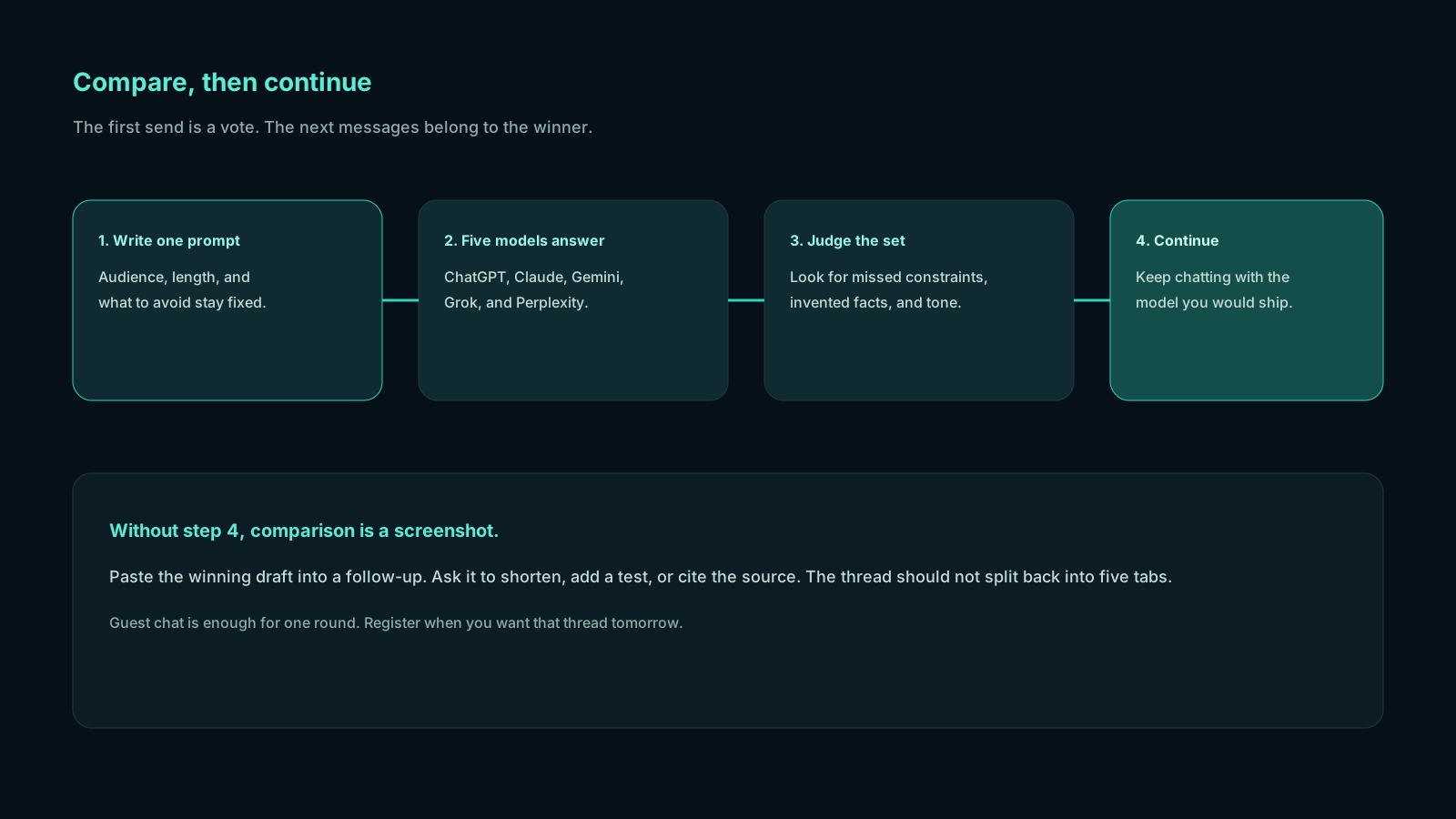
ChatGPT and Claude in one place is not a mash-up that blends the two voices into one paragraph. Blending is how you get a draft that sounds like nobody.
The useful version is:
- One prompt, sent once.
- Two (or five) answers you can read as a set.
- A human choice.
- Follow-ups that stay with the chosen model.
What changes in practice:
- The prompt stays honest. You stop writing a "ChatGPT version" and a "Claude version." The comparison is fair.
- Disagreement is visible. If ChatGPT outlines three sections and Claude says section two is legally sloppy, you see the conflict before you publish.
- You stop losing the runner-up. The losing answer often contains the constraint you needed. When it sits next to the winner, you can steal one bullet without keeping a second thread alive.
- Continuation is clean. After you pick, the next message should not re-summon the model you already rejected for this task.
You can try that loop as a guest. Register when you want the thread saved.
ChatGPT Claude same prompt: a working method
ChatGPT Claude same prompt is the whole method. Do not improvise a second brief because one UI "likes more context." Write the brief once, as if a colleague will grade both answers.
Use this skeleton:
Audience: [who will read this]
Job: [what "done" looks like]
Constraints: [length, tone, things to avoid]
Source: [paste the text, or say you have no source]
Output: [format you will actually use]
Send it to ChatGPT and Claude together. If the work also needs live links, a Google-flavored take, or a blunt second opinion, send it to Perplexity, Gemini, and Grok in the same round. You are still using ChatGPT and Claude together; you are just refusing to pretend they are the only two models on earth.
Score the replies on a four-line card:
- Correct: Did it obey the constraints?
- Complete: Did it skip the hard part?
- Voice: Would you send this under your name?
- Risk: Did it invent a fact, a citation, or an API?
Then continue with the winner. If ChatGPT won the structure and Claude won the caveats, you have two legitimate next steps: continue with ChatGPT and paste Claude's caveats into the follow-up, or continue with Claude and ask it to adopt ChatGPT's outline. Do that inside the winning thread. Do not open tab three.
A fuller pairwise write-up lives in ChatGPT vs Claude. The side-by-side habit is spelled out in How to compare AI models side by side. The five-model version is ChatGPT vs Claude vs Gemini vs Grok vs Perplexity.
What to do when the two answers disagree

Disagreement is the point. Treat it as data.
They disagree on facts. Believe neither. Open the source, or run Perplexity for retrieval. ChatGPT and Claude can both sound sure while citing nothing you can click.
They disagree on structure. Pick the outline you would actually present. Ask the winning model to absorb the better heading from the loser. One follow-up, not a new chat.
They disagree on tone. Your name is on the email. Choose the voice. Do not average them into beige.
They agree too quickly. That can mean the question was easy—or that both models followed the same popular pattern. If the stake is high, bring Gemini, Grok, or Perplexity in on a fresh compare round with a tighter constraint ("list assumptions," "argue the opposite").
The mistake is to keep both threads going "in case." Parallel follow-ups recreate the tab tax you were trying to kill. Use ChatGPT and Claude together for the first look. Use one of them for the rest of the hour.
Continue with the winner, then stay there
The second half of the workflow is the half most people skip.
After you choose, the next messages should assume that model is the partner. Ask it to shorten, to add a section, to generate tests, to write the email. Do not bounce back to the other tab because you are curious. Curiosity is how you get two slightly different PDFs and a meeting that starts with "which version are we discussing?"
A clean continue-with-winner loop:
- Compare on the first prompt.
- Name the winner out loud ("Claude for this brief").
- Paste any one useful line from the loser into the winning thread.
- Work there until the deliverable exists.
- If the task type changes—coding after writing, research after drafting—start a new compare round with a new prompt. Do not drag five personalities through one outline.
That is how you use ChatGPT and Claude together without living in the switcher.
Compare these models on Chativo with the brief already on your clipboard. See packages if this is daily work: Starter is $5/month, Plus is $10/month, Pro is $20/month. Guest chat is enough to learn the motion. Register for history.
When to add Gemini, Grok, and Perplexity
Two models are enough when the job is "draft vs edit." Five models are better when the job is "I do not know which skill I am missing."
- Add Gemini when the files or the question sit near Google, or you want a Search-flavored pass.
- Add Perplexity when you need sources you can open.
- Add Grok when both ChatGPT and Claude are being too polite.
You still pick one winner. The extra streams are not extra conversations. They are extra first looks.
Frequently asked questions
Straight answers to the questions this article usually raises. Each question is separate from its answer so you can scan on a phone or a desktop.
How do I use ChatGPT and Claude together without two subscriptions?
Send one prompt to both in a compare workspace, read the pair, and continue with the winner. You need both answers, not always both consumer plans. ChatGPT Plus is typically around $20/month; Claude Pro is in a similar range. A single workspace at $5, $10, or $20 per month is built for the compare-then-continue loop.
Can ChatGPT and Claude in one place mix their voices?
They should not. Keep the first round side by side. After you pick, stay with that model's voice so the document stays coherent.
Why not just pick one model and stick with it?
You can, if your work is truly one shape. Most people who keep both tabs already know their work is not one shape. The goal is to stop paying the tab tax every morning.
Does the ChatGPT Claude same prompt need to be long?
It needs to be specific. Audience, done-definition, constraints, and source beat a three-paragraph pep talk. Short and precise compares better than long and vague.
Should I start a new compare for follow-up questions?
Only when the job changes. Follow-ups on the same deliverable should stay with the winner. A new deliverable deserves a new first prompt.
Related reading
- How to Reduce AI Hallucinations by Comparing Model Answers
Cross-check ChatGPT, Claude, Perplexity, Gemini, and Grok on the same prompt so invented facts show up before you trust a single reply.
- How to Get Better AI Answers by Comparing Multiple Models
One model is a draft. Several models are a review. Learn how to compare multiple AI models on the same prompt, pick the winner, and continue the thread without tab-switching.
- How to Choose the Right AI Model for Any Task
Match the task to the model, then verify with a live compare. This AI model selection guide shows which AI model you should use for writing, coding, research, and fast answers.