How to Choose the Right AI Model for Any Task
9/11/2026 · Chativo Editorial · 8 min read
Learning how to choose the right AI model is less about brand loyalty and more about matching the job in front of you. ChatGPT, Claude, Gemini, Grok, and Perplexity are all capable, and they still disagree on structure, caution, sources, and tone. This AI model selection guide gives you a task-to-model map you can use today, then a faster habit: skip the guesswork and compare the same prompt live before you commit.
If you have ever asked “which AI model should I use?” and then opened the assistant you used yesterday, you already know the failure mode. Habit is not a strategy, and it is not how to choose the right AI model when the next task is a legal-sounding email, a live news question, or a gnarly refactor.
How to choose the right AI model without guessing

Start with the task, not the logo. Write one sentence that names the output you need, the constraints that matter, and the risk if the answer is wrong. Then pick a default model for that shape of work. Finally, test the default against at least one other model on the same prompt.
That three-step loop is the whole method:
- Name the job. Draft, reason, retrieve, code, or decide.
- Pick a default. Use the map below as a starting point, not a law.
- Compare. If the output will be sent, shipped, cited, or billed, run more than one model.
Chativo exists for step 3. One prompt goes to ChatGPT, Claude, Perplexity, Gemini, and Grok together. You read the streams, then continue with the winner. Compare these models on Chativo when the next section would otherwise turn into a coin flip. See packages if you want that loop on Starter ($5), Plus ($10), or Pro ($20).
A task-to-model map you can actually use

Treat the notes below as typical strengths, not trophies. Models change. Your prompt matters more than a blog’s ranking. Use this as an AI model selection guide for the first send, then let the replies argue.
Fast general drafts and everyday questions
Default: ChatGPT. It is a strong generalist for outlines, explanations, brainstorms, and “make this clearer” edits. If you need a usable first draft in a familiar voice, start here.
Check with: Claude, if tone or long-context care might matter more than speed of getting to a draft.
Long writing, careful tone, and document-heavy work
Default: Claude. It often holds nuance, hedges when it should, and stays with long briefs. Use it for essays, policies, sensitive emails, and anything where a glib answer would be a problem.
Check with: ChatGPT, if you need a punchier structure, and Gemini, if the material lives closer to Google’s world of docs and data.
Live web questions and source-seeking research
Default: Perplexity. When the task is “what is true right now, and where did that come from?”, a research-oriented model is the honest first pick.
Check with: ChatGPT or Claude on interpretation once you have sources, so you are not treating a search-shaped answer as the only analysis.
Google-adjacent work and multimodal context
Default: Gemini. If the job sits next to Search, Docs, Gmail, or Workspace habits, Gemini is a reasonable default. It is also a common pick when the prompt includes images or mixed media that you want a Google-family model to handle.
Check with: ChatGPT for a second framing, and Perplexity if you still need explicit web-backed claims.
Direct, current, conversational answers
Default: Grok. When you want a less formal pass, a blunt take, or a second opinion that does not sound like a press release, Grok is a useful default.
Check with: Claude if the topic needs more care, and ChatGPT if you need a cleaner deliverable from the same idea.
Coding, debugging, and implementation plans
Defaults split. ChatGPT and Claude are the usual pair for code. Gemini is worth a look on larger mixed-context problems. Grok can be a fast rubber duck. Perplexity helps when the missing piece is a current library note rather than a design.
Do not freeze a single “best coder” in your head. For a fuller matrix, see best AI for coding. The short version of how to choose the right AI model for code: describe the repo constraint in the prompt, then compare at least two implementations before you paste anything.
Reasoning models change the map, not the method
Some tasks are not “write a paragraph.” They are “think in steps, use tools, and check the work.” OpenAI’s o3-class reasoning models are built for that shape of problem: harder math, multi-step coding, science questions, and cases where the model should browse, run code, or inspect visuals while it reasons.
OpenAI’s launch walkthrough of o3 and o4-mini is the clearest public demo of that style:
Watch it if you need a picture of tool-using reasoning. Then come back to the method. A reasoning model is still a candidate, not a verdict. It can overthink a simple rewrite. It can also catch a flaw a faster chat model skates past. Which AI model should I use for a reasoning-heavy prompt? Start with a reasoning-capable option when the cost of a wrong chain of thought is high, and still compare the final answer with a second model before you trust it.
The video will not tell you what Claude, Gemini, Grok, or Perplexity would say to your prompt. Only a live compare will.
Decision rules that survive model updates
Brand names move. These rules last longer.
If the output will be published, compare. One fluent paragraph is not a review process. Run the same brief across models and keep the strongest structure, the safest claim, and the best closer. Merge by hand if you must. Do not average nonsense.
If the output will be executed, compare. Code, formulas, and step-by-step operations fail in private. Two implementations that agree are more useful than one confident patch.
If the output depends on the live web, retrieve, then interpret. Let a research-oriented model collect, then let a writing-oriented model explain. That is still how to choose the right AI model when “search” and “prose” are different jobs.
If the audience is a human who knows you, optimize for voice. The technically complete answer can still be the wrong email. Compare tone on purpose.
If you are stuck, shorten the prompt, not the model list. Vague prompts make every model look average. Add the audience, the format, the banned moves, and one example.
For a model-by-model landscape rather than a workflow, read ChatGPT vs Claude vs Gemini vs Grok vs Perplexity. For the compare habit itself, continue with how to compare multiple AI models.
Skip the guesswork and compare on one prompt
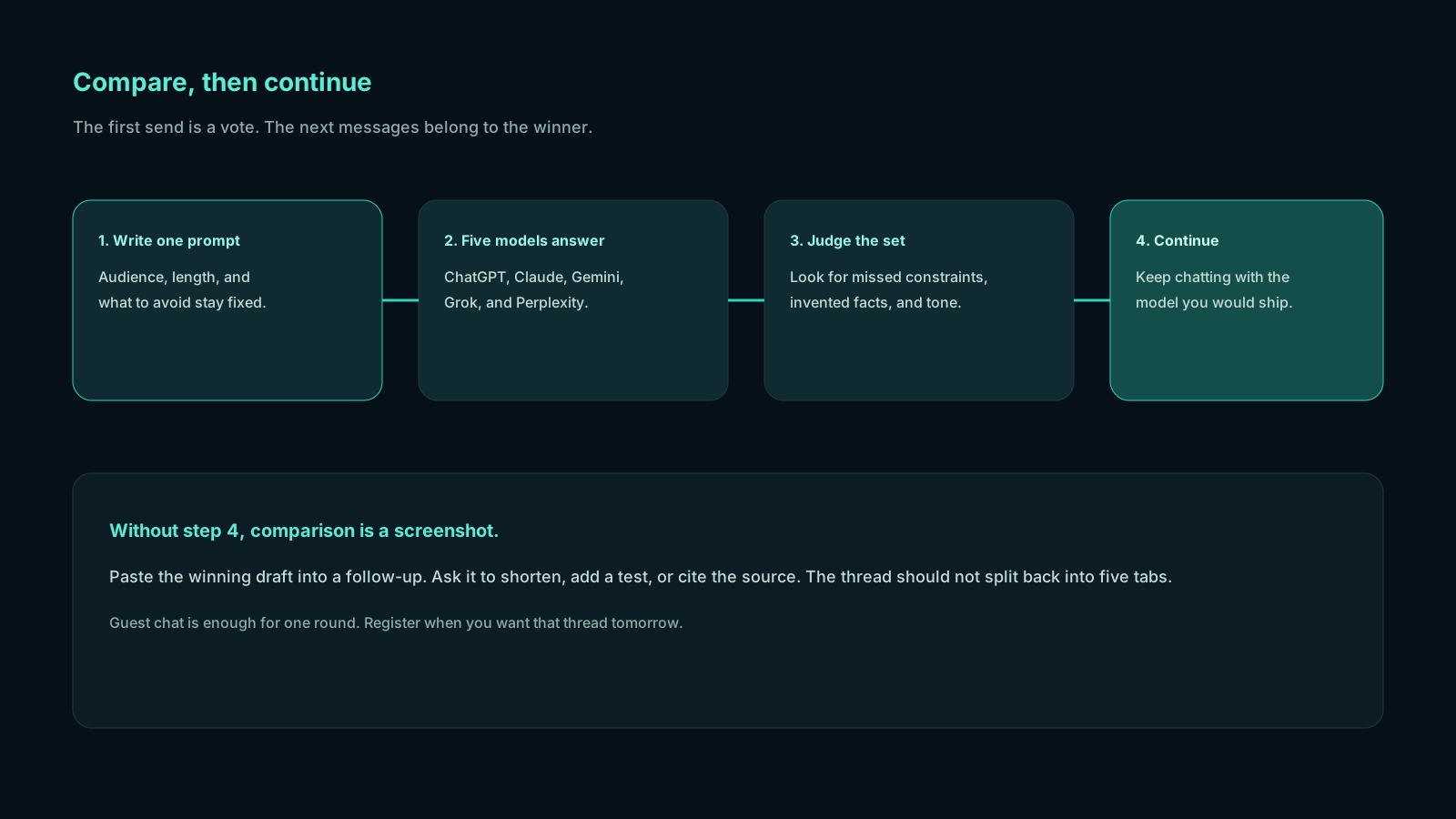
The map above is a courtesy. The honest end of any AI model selection guide is: you will be wrong sometimes, and the cheapest correction is a second opinion on the same words.
That is the Chativo workflow, built by MB Stack Company:
- Paste the real task.
- Watch five answers stream.
- Mark the winner for this job, not for all jobs.
- Continue the thread with that model so follow-ups stay consistent.
- Register when you want history. Use projects when the work is ongoing.
Guest chat is there so you can test the method on a prompt you already care about. You do not need a stack of subscriptions to learn which AI model should I use this afternoon.
Compare these models on Chativo. When you want the workspace on a plan, see packages: Starter $5, Plus $10, Pro $20.
A worked example you can copy
Suppose the task is: “Write a 180-word update to a client who is nervous about a delayed launch. Be honest, calm, and specific. Offer two next dates.”
Task type: careful writing with a relationship at stake.
Default: Claude, because tone and hedging matter.
Compare set: ChatGPT (clearer structure), Gemini (another professional register), Grok (too blunt? you will find out), Perplexity (usually the wrong tool here unless you also need to confirm a public fact).
What you look for in the five replies:
- Did it admit the delay without drama?
- Did it invent a cause you did not provide?
- Are the dates actually dates, or vague “soon”?
- Would you send it without rewriting the first sentence?
You will often steal a subject line from one model and a closing from another. That is still choosing. The winner is the thread you continue, not a scoreboard. Repeat this on a coding prompt, a literature scan, or a landing-page outline. The task changes. The method does not. That is still how to choose the right AI model when the cost of a bad send is real.
Frequently asked questions
Straight answers to the questions this article usually raises. Each question is separate from its answer so you can scan on a phone or a desktop.
Which AI model should I use if I can only pick one?
Pick a generalist such as ChatGPT for mixed days, then keep a second model for the jobs the generalist is weak at: live web for Perplexity, long careful prose for Claude. If you can run five at once, you do not have to freeze a single default.
Is there a reliable AI model selection guide that never changes?
No. Models update. A durable guide teaches task types and a compare step, not a permanent ranking. Re-run your real prompts when a new reasoning or coding model lands.
Should I always use a reasoning model?
No. Reasoning models help on multi-step, tool-using, or high-stakes problems. They are extra machinery for a simple rewrite. Match effort to the task, then compare if the answer will be used.
How do I choose for coding specifically?
State the language, the constraint, and what “done” looks like. Compare at least two models. Prefer the answer that compiles in your head: clear steps, fewer hidden assumptions, tests you can run. See best AI for coding for a fuller comparison.
Can I try this method without paying first?
Yes. Chativo offers guest chat so you can send one prompt to ChatGPT, Claude, Perplexity, Gemini, and Grok, then continue with the winner. Register to keep history. Plans are Starter $5, Plus $10, and Pro $20.
Related reading
- How to Reduce AI Hallucinations by Comparing Model Answers
Cross-check ChatGPT, Claude, Perplexity, Gemini, and Grok on the same prompt so invented facts show up before you trust a single reply.
- How to Get Better AI Answers by Comparing Multiple Models
One model is a draft. Several models are a review. Learn how to compare multiple AI models on the same prompt, pick the winner, and continue the thread without tab-switching.
- Stop Switching Between ChatGPT and Claude: Use Both in One Chat
Use ChatGPT and Claude together on the same prompt instead of bouncing between tabs. Compare both with Gemini, Grok, and Perplexity, then continue with the winner.