Chativo Review: Compare ChatGPT, Claude, Perplexity, Gemini, and Grok in One Chat
9/12/2026 · Chativo Editorial · 8 min read
Chativo AI is a multi-model chat workspace from MB Stack Company. You send one prompt to ChatGPT, Claude, Perplexity, Gemini, and Grok together, then continue the thread with the reply you trust. This Chativo AI review explains what the product is, how it works, what it costs, and what it does not try to be.
It is a comparison workspace. It is not a claim that you can throw away every specialized AI tool. If you need image generation, in-editor coding agents, or a single official app with that vendor’s unique features, those still live elsewhere. If you need to choose a voice before you commit an hour of follow-up, this is the job Chativo is built for.
What is Chativo AI?

Chativo AI is the public name for a straightforward loop: compare, then continue. The first message in compare mode streams five cards in parallel. You read them as a set. When you click continue on a card, that answer becomes the assistant turn and later messages go to that provider only.
That loop is the product. Everything else—guest sessions, accounts, packages, projects on higher plans—exists to make the loop usable more than once.
If you arrived from a model-vs-model article, the five-way showdown is the editorial comparison. This page is the product: where those five names run, how billing works, and who should bother.
Chativo AI review: how the workspace works
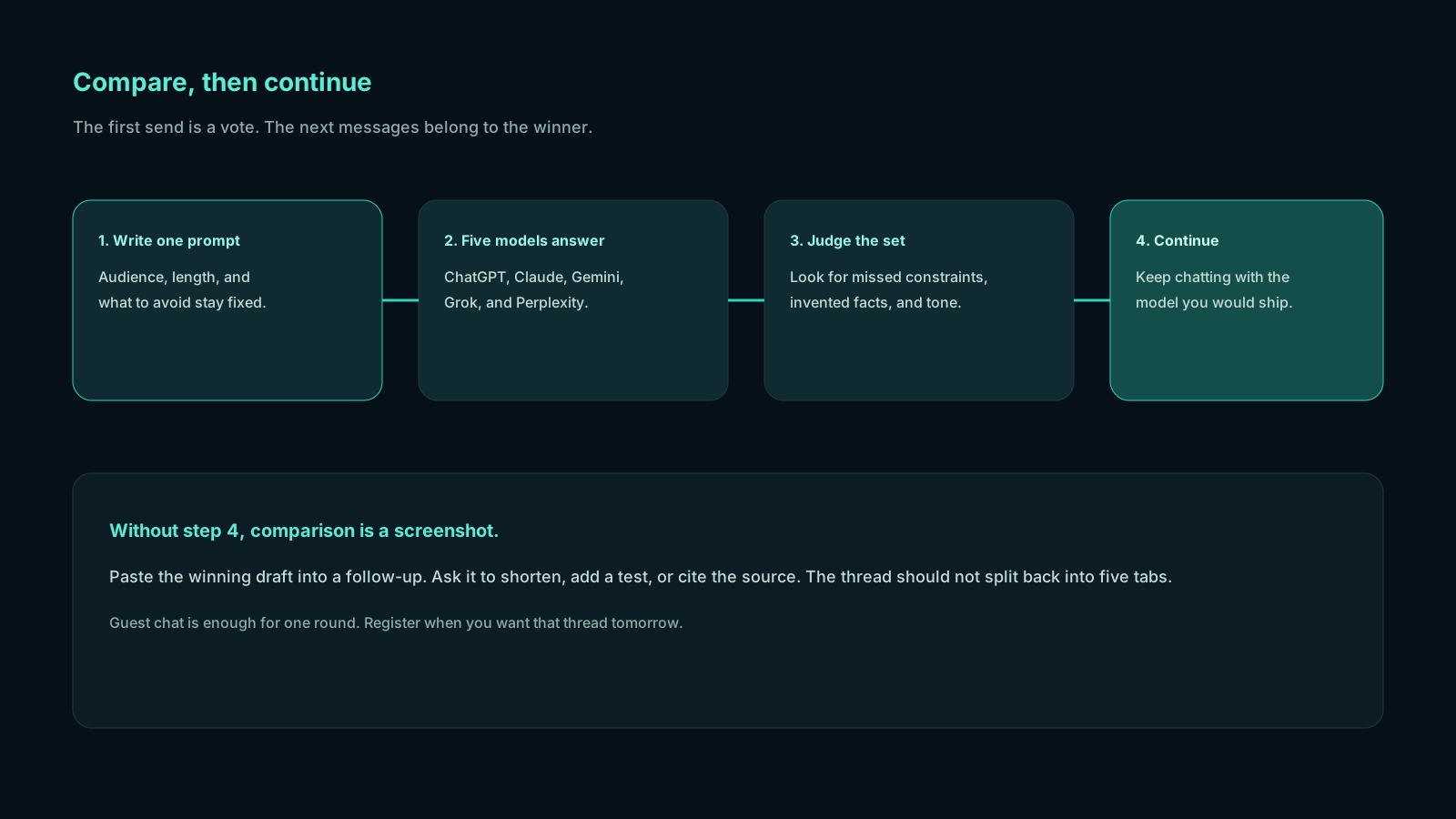
A fair Chativo AI review has to describe the clicks, not only the positioning.
- Open chat as a guest or while signed in.
- Write a real prompt. The useful ones name audience, constraints, and what “done” means.
- Send in compare mode. Five streams start: OpenAI’s ChatGPT, Anthropic’s Claude, Perplexity, Google’s Gemini, and xAI’s Grok.
- Read for disagreement, missing facts, and tone. One failure on a card does not cancel the others.
- Continue with the winner. The thread is now a single-model conversation.
- If you need another five-way vote, start a new compare rather than pretending the chosen model still speaks for the committee.
Registered users can keep history. Guests can try the grid without turning the first session into an account form. When you are ready to save work, register. Plus adds projects so serious threads are not a flat list.
The same idea, described as a category, is a multi-model AI chat platform. Described as a buying tool, it is an AI chatbot comparison tool you actually type into, not a static table.
Features that matter in daily use
Strip the adjectives. These are the parts you will notice in a week of use.
Parallel compare. One composer, five live answers. You are not pasting the prompt five times, so you are not accidentally improving it on the last paste.
Continue with a chosen model. The compare step is not a dead end. Follow-ups stay with the provider you picked.
Guest chat. A first look without a full signup. There is a guest limit; when you hit it, create an account to keep going. That is expected, not a trick.
Accounts and history. Threads persist when you register, which is the difference between a demo and a workspace.
Projects (Plus and above). Group chats when the work is bigger than one prompt.
Packages. Starter, Plus, and Pro, billed monthly. Details in the next section.
Safepay. Checkout for Pakistan, with packages listed in US dollars.
Support lanes by plan. Email support on Starter; priority support on Plus; a dedicated support lane on Pro.
What you will not find, and should not expect: a promise that the five models are always available from their vendors, a private model trained on your company drive, or a score that “proves” which card is true. Chativo shows answers. You still judge them.
Chativo pricing: Starter, Plus, and Pro
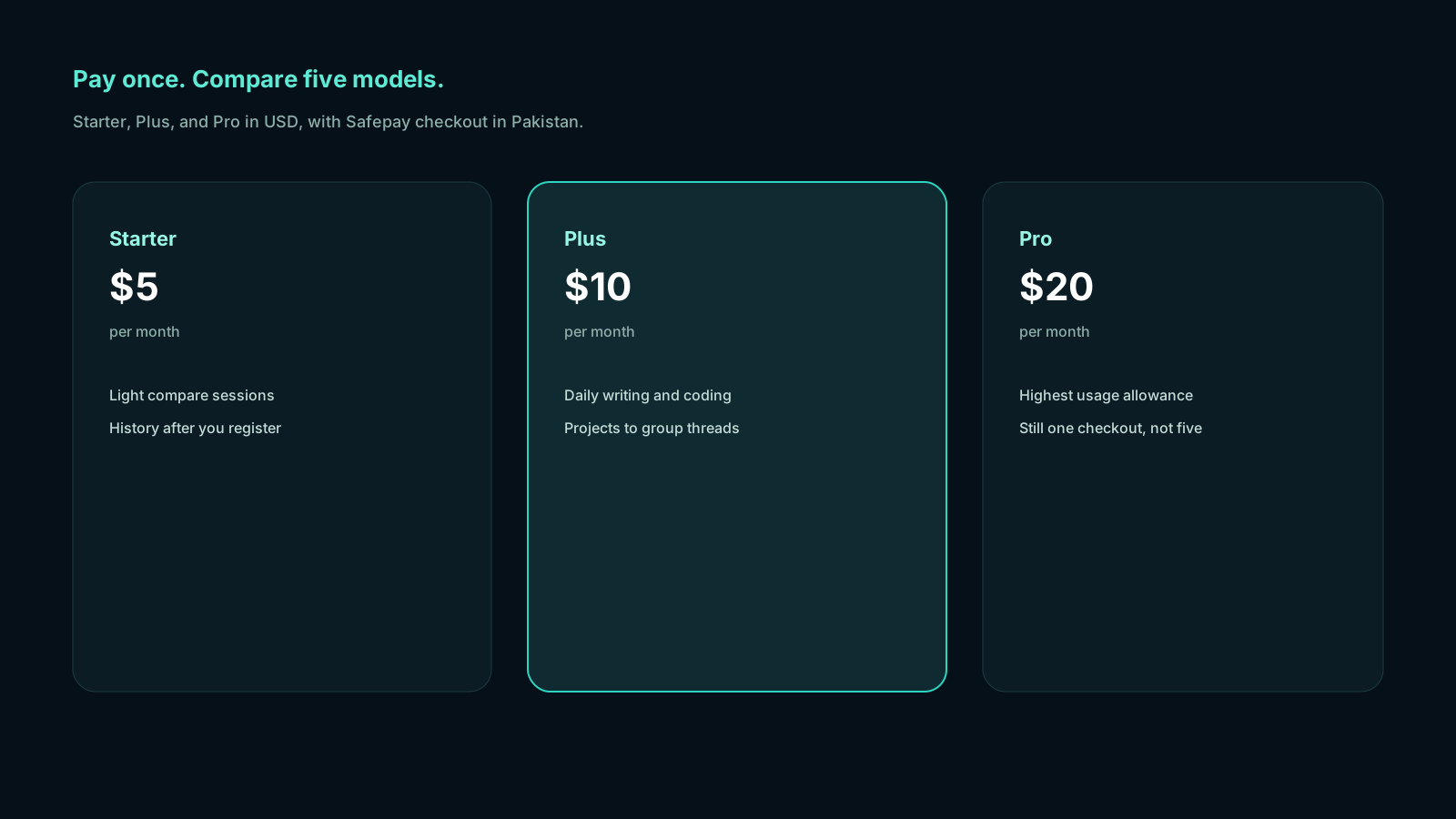
Pricing is simple on purpose.
| Package | Price | Who it fits | What you get |
|---|---|---|---|
| Guest | $0 to try | First look | Compare chat until the guest limit |
| Starter | $5 / month | Light compare sessions | Full 5-model compare, chat history sync, email support |
| Plus | $10 / month | Daily work | Everything in Starter, projects and organization, priority streaming, priority support |
| Pro | $20 / month | Power users | Everything in Plus, highest usage allowance, early feature access, dedicated support lane |
Numbers above are the public monthly prices. Pay for the cadence you will keep. If you compare a few times a month, Starter is the honest match to “light compare sessions.” If compare is part of how you write every weekday, Plus is labeled for that. Pro is the higher-allowance plan, not a different philosophy of chat.
Checkout in Pakistan can use Safepay. You still see USD package labels. Create an account before you subscribe; guest inboxes are not a billing identity.
See current packages when you are ready to pay. Use guest chat when you are not.
Who Chativo is for
Chativo is for people who already open more than one chatbot and are tired of pretending that is efficient.
- Writers and operators who want tone options on the same brief.
- Students who should not trust a single fluent paragraph (and should still read the source).
- Developers who want two or three implementations of the same function before they touch the repo—then still check official docs.
- Researchers who want Perplexity’s links next to a reasoning draft from Claude or ChatGPT.
- Freelancers and small teams who cannot justify five separate premium chat subscriptions just to sample voices.
- Anyone in Pakistan who wants this workflow with Safepay rather than a stack of foreign-only checkouts.
It is also a reasonable ChatGPT alternative in the narrow sense that you are not locked to one vendor’s app. ChatGPT is still on the grid. You are not asked to quit it.
What Chativo is not
A review that only sells is not a review. Limits, plainly:
- Not a replacement for every specialized tool. Image generators, slide tools, and IDE-native agents are different products. Use them when the job is theirs.
- Not a truth machine. Five agreeing cards can still be wrong. Compare to catch many one-off hallucinations; verify anything that matters.
- Not the official ChatGPT, Claude, Gemini, Grok, or Perplexity app. Vendor-specific features, plugins, and file UIs may exist only in those products.
- Not an enterprise search suite. It does not claim to index your whole company.
- Not a promise of unlimited guest use. Try as a guest, then register.
If you only ever want one model and you already like its official client, stay there. Chativo’s value shows up when the first answer is a decision, not a destination.
Official apps vs this workspace
Keep the official ChatGPT, Claude, Gemini, Grok, or Perplexity apps when you need a vendor-only feature: a specific file UI, a plugin, or a product experiment that Chativo does not wrap. Use Chativo when the first job is choosing. The two can coexist. Many people will still open a specialist app after they know which model they want to live with for an hour.
| You already have | What Chativo adds | What it does not replace |
|---|---|---|
| One favorite official chat app | Four other answers to the same prompt | That vendor’s unique extras |
| Five bookmarks | One send, one screen, one continue step | Image tools and IDE agents |
| A stacked set of subscriptions | A cheaper way to sample the set | Unlimited guest use |
| A static “best AI” blog table | Live drafts you can keep chatting with | Proof that a claim is true |
That table is the whole review in miniature. Chativo AI is useful when the empty cell you care about is “I have not seen the other answers yet.”
How to run a fair first test
Do not test with “write a poem about the moon.” Test with work.
Paste a prompt you would have sent to ChatGPT anyway: a tricky email, a function you need to implement, a research question with a date. Read all five cards. Ask:
- Which one preserved my constraints?
- Which one invented a fact?
- Which one would I let a client see after a five-minute edit?
Continue with that winner and do the real follow-up work: shorten the email, add tests, demand sources. If the continue step feels natural, the product fits. If you never look at more than one card, you may not need a comparison workspace.
Guest chat is the right first door. Register when you want the thread tomorrow. If you are in Pakistan and you already know you will compare weekly, look at Safepay checkout on the pricing page rather than stacking five foreign subscriptions “just in case.”
MB Stack Company ships Chativo as that workspace. The brand question “what is Chativo” should have a boring answer: five models, one prompt, then a chosen thread. The interesting part is whether that boredom saves you an evening of tab-switching.
Frequently asked questions
Straight answers to the questions this article usually raises. Each question is separate from its answer so you can scan on a phone or a desktop.
What is Chativo AI?
Chativo AI is a compare-then-continue chat product. ChatGPT, Claude, Perplexity, Gemini, and Grok answer the first prompt together. You keep chatting with the model you pick. It is built by MB Stack Company.
Is this Chativo AI review claiming awards or user counts?
No. This Chativo AI review describes the workflow, features, and published prices. It does not invent testimonials, rankings, or performance percentages. You should judge it on a prompt from your own work.
Who should skip Chativo?
Skip it if you already live in one official app, never want a second opinion, or your job is mostly image generation or in-IDE agents. Those are different tools. Chativo is for people who compare chat models on purpose.
How does Safepay billing work in Pakistan?
Paid packages are Starter $5, Plus $10, and Pro $20 per month, shown in USD. In Pakistan, checkout can run through Safepay after you create an account. Confirm the live checkout flow on the pricing page.
Can I try before I pay?
Yes. Guest chat exists for that. When you want history or a paid allowance, register and pick a package. Open the chat with a prompt you actually need to send.
Related reading
- Best AI for Emails and Proposals: Compare Drafts from 5 Models
Ask one brief, compare five tones from ChatGPT, Claude, Perplexity, Gemini, and Grok, then continue with the draft you would actually send.
- ChatGPT, Claude, Gemini, Grok, and Perplexity in One App
Run one prompt across ChatGPT, Claude, Gemini, Grok, and Perplexity in a single chat, then continue with the answer you actually want to use.
- Best Claude Alternative If You Want Multiple AI Models in One Place
Keep Claude for the work it does well, and compare ChatGPT, Perplexity, Gemini, and Grok on the same prompt when you need a different strength.