ChatHub vs Chativo: Browser Extension vs Dedicated AI Comparison Workspace
9/9/2026 · Chativo Editorial · 8 min read
ChatHub is a browser extension for chatting with multiple models, often side by side in the browser. Chativo is a dedicated AI comparison workspace: one prompt, five live answers from ChatGPT, Claude, Perplexity, Gemini, and Grok, then continue with the winner. If you want a ChatHub alternative that lives as a full product instead of an add-on, start there.
This is not a takedown of extensions. Extensions are good at meeting you where you already work: a tab, a page, a quick compare without opening another site. Dedicated workspaces are good at the rest of the job: accounts, chat history, projects, streaming that does not depend on a browser toolbar, and a thread that continues after you pick a model.
A ChatHub review that only says “it does side by side” is incomplete. Side by side is the shared idea. The product question is where the conversation lives after the first glance.
| Dimension | ChatHub | Chativo |
|---|---|---|
| Product type | Browser extension (multi-model chat, often side by side) | Dedicated web workspace |
| Default job | Compare models in the browser | Compare five models, then continue with the winner |
| Models in the pitch | Multiple models in-browser (see ChatHub for the current list) | ChatGPT, Claude, Perplexity, Gemini, Grok |
| After the first answers | You keep working in the extension UI | You lock a provider and continue the thread |
| History and projects | Depends on the extension/account surface | Chat history; projects on higher plans |
| Setup | Install an extension; browser permissions apply | Open chat in the browser, including guest chat |
| Pricing | ChatHub’s own plans (check ChatHub; not listed here) | $5 / $10 / $20 |
Do not treat this table as a feature checklist of ChatHub’s entire catalog. Extensions change. If a capability is not publicly obvious, it is omitted rather than invented.
Extension vs dedicated workspace

A ChatHub Chrome extension alternative is not “the same panes, different domain.” The container changes the product.
An extension rides along with Chrome (or another browser). That is convenient. It is also a permission surface, an update surface, and a UI that has to fit around the page you were already on. If the extension is disabled, the browser profile is fresh, or you are on a machine that blocks add-ons, the tool is gone. Side-by-side chat in the browser is still a strong idea. It is just tied to the browser.
A dedicated workspace is a site you open on purpose. You sign in (or start guest chat). History is a first-class object. Compare streaming is the home screen, not a panel clipped to a webpage. After you choose a winner, the rest of the chat is a normal thread with that model. You are not managing panes for every follow-up.
Chativo is built by MB Stack Company around that second shape. ChatHub is built around the first. Plenty of people will prefer the first for speed. Plenty of people will outgrow it when the work is a proposal, a research brief, or a multi-turn debug, not a one-look compare.
For the category definition, see Best AI Chatbot Comparison Tool. For the mechanics of a same-prompt round, see How to Compare AI Models Side by Side.
Why teams look for a ChatHub alternative

Searches for a ChatHub alternative usually mean one of these:
The extension is no longer the right home. You started with a toolbar because it was easy. Now you want saved threads, a stable URL, and a product that still works when you are not in that browser profile.
You want continue-with-winner, not permanent panes. Side by side is excellent for the first response. It is noisy for turn four. A dedicated compare workspace is built to collapse: five cards, then one conversation.
You want a named five-model round. ChatGPT, Claude, Perplexity, Gemini, and Grok are the set many knowledge workers already juggle. A workspace that always runs that set is easier to teach a team than “open the extension and tick some boxes.”
You want to try without installing anything. Guest chat is a browser tab. No extension review, no permission prompt, no “ask IT to allow this add-on.”
A ChatHub review should admit the extension still wins for in-page convenience. If you live in docs and want a compare panel without leaving the tab, that is a real preference. This page is for people who decided the add-on is not enough.
Side by side is not the same as compare-then-continue
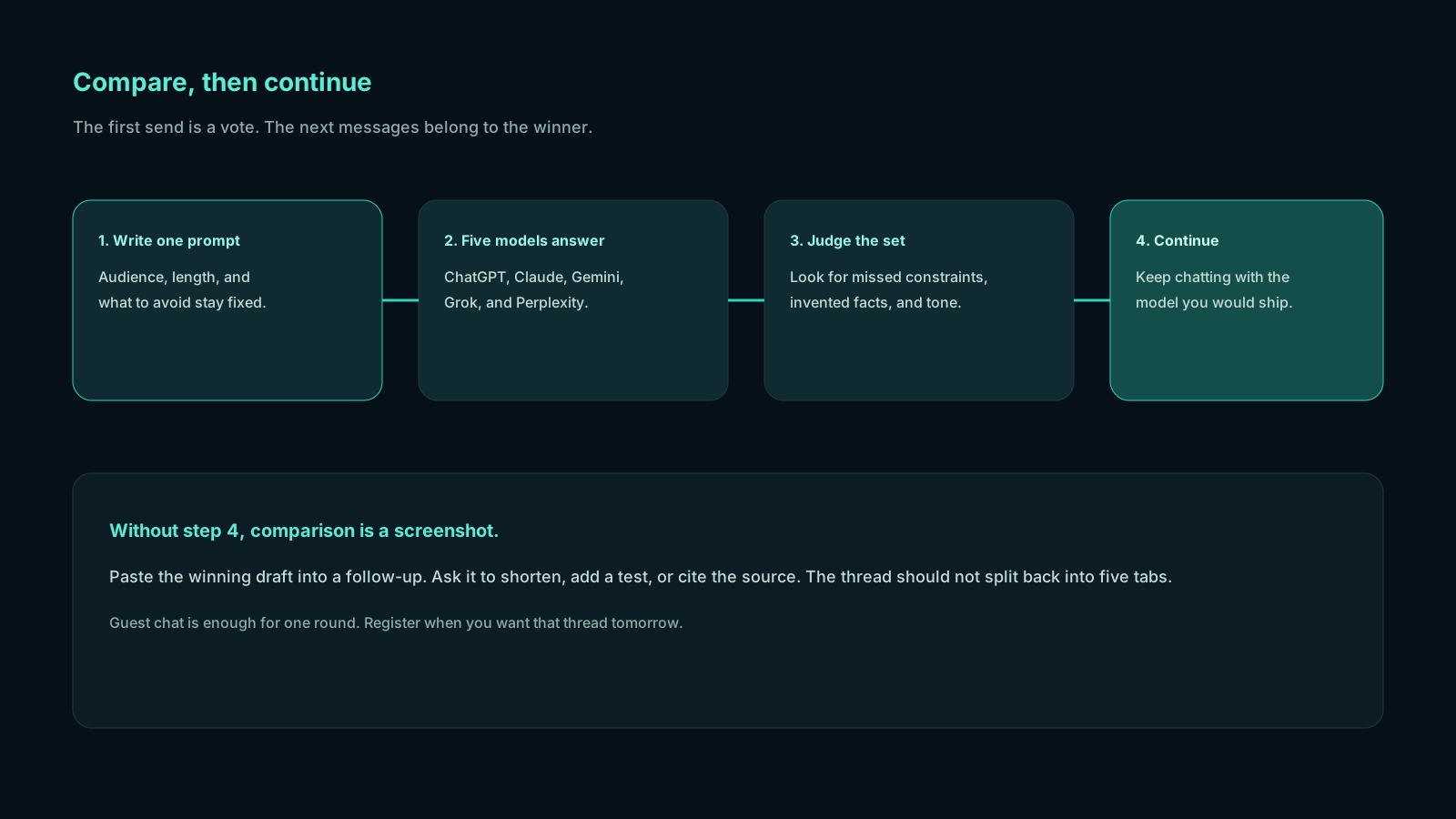
People use “side by side” as a synonym for “I compared them.” It is not.
Side by side is a layout. Two or more models answer in columns. You scroll. You copy. You may or may not have a clean way to say “this one is the assistant now.”
Compare-then-continue is a workflow. One prompt. Five live answers. A choice. The chosen answer becomes the thread. Later messages are not a second compare unless you start a new round.
If you only needed the layout, an extension can be enough. If you needed the workflow, you want a product that treats selection as a first-class action. That is the gap this ChatHub alternative is built to fill.
Try it with work you already do:
- Open chat without installing anything.
- Paste a prompt you would have sent through the extension.
- Read ChatGPT, Claude, Perplexity, Gemini, and Grok as they stream.
- Continue with the winner. Ask a follow-up that depends on the first answer.
If step 4 feels like the missing piece, you were not looking for another pane. You were looking for a thread.
A ChatHub review of daily friction
A fair ChatHub review includes the friction that does not show up in screenshots.
Browser coupling. Updates, profile sync, and IT policies all sit between you and the tool. Dedicated workspaces have their own outages, but they do not disappear when someone turns off extensions.
Permission anxiety. Serious users should care what an extension can read. A chat site still processes your prompts, but it is a different trust model than a toolbar with page access. Compare vendors’ policies yourself; do not skip that because the UI is pretty.
Continuation. After a side-by-side round, where does the next message go? If the answer is “all of them again” or “copy into a new box,” you are doing extra work. Continue-with-winner is the boring feature that saves the afternoon.
Teaching someone else. “Install this extension, pin it, sign in, pick models” is a longer onboarding than “open this URL, send a prompt.” Teams feel that.
ChatHub can still be the right ChatHub. Power users who already live in Chrome and want panes next to the current page should evaluate it on that job. This article exists because a large group of those users later want a ChatHub Chrome extension alternative that behaves like a full app.
If the original pain was leaving ChatGPT’s site, the broader menu is in Best ChatGPT Alternative.
History, accounts, and streaming
Dedicated workspaces earn their keep on the second session.
You will want yesterday’s compare. You will want to reopen the thread you continued with Claude, not a screenshot of five columns. You will want an account that is not identical to “whatever Chrome profile I had at the office.”
Streaming belongs in that list. Five cards filling at once is how comparison stays honest. You see which model stalled. You see which one went long. You do not wait in series because the extension is juggling panels one after another in a way you cannot see. (How any given extension schedules requests is its own implementation; the product you feel is still “are they all in front of me, live?”)
Plus and Pro plans on pricing add organization for people who run this as daily work. Starter at $5 is the light compare package. Guest chat is the no-install trial.
Pricing and who should stay on an extension
ChatHub’s prices are ChatHub’s. They are not quoted here because they change and because this page is not a scrape of their checkout. Chativo’s public plans are $5, $10, and $20 per month.
Stay on an extension if:
- You want compare panes without leaving the current page
- You are comfortable installing and authorizing a browser add-on
- Your sessions are short and you barely need history
Move to a dedicated workspace if:
- You want ChatGPT, Claude, Perplexity, Gemini, and Grok as a repeatable round
- You want to continue with one model after you compare
- You want guest chat, saved history, and a product URL you can bookmark
- Your company is uneven about extension installs
Those are workflow tests. Run them before you argue about brands.
Frequently asked questions
Straight answers to the questions this article usually raises. Each question is separate from its answer so you can scan on a phone or a desktop.
Is Chativo a ChatHub alternative?
Yes, if you want a dedicated comparison workspace instead of a browser extension. No, if your only requirement is a toolbar panel on the current webpage. A ChatHub alternative should be chosen by container and workflow, not by who used the phrase “side by side” first.
Does a ChatHub Chrome extension alternative need an install?
Chativo does not. You open a site, use guest chat or an account, and run the five-model compare in the page. That is the practical difference for people who cannot or will not install add-ons.
Is a ChatHub review enough to decide?
A ChatHub review can explain panes and model lists. It cannot tell you whether you need continue-with-winner. Send one real prompt through both shapes of product and see which thread you actually finish.
Can I compare AI models side by side without an extension?
Yes. A dedicated workspace can stream multiple answers to one prompt in one view. That is the point of compare-then-continue. You are not required to clip the UI to Chrome to get a comparison.
What does Chativo cost if I leave the extension?
Plans are $5, $10, and $20 per month. Try guest chat first, then open pricing if you want history and a paid allowance.
If the extension taught you that comparison matters, keep the lesson and change the container. Compare five models in a workspace, pick a winner, and finish the work there.
Related reading
- OpenRouter vs Dedicated Multi-Model Chat: Which Is Easier for Daily Work?
OpenRouter is a strong API router for developers. A dedicated multi-model chat workspace is usually easier for daily writing, research, and coding. Here is a fair way to choose.
- Magai vs Chativo: Is a Dedicated AI Comparison Tool Worth It?
Magai is a multi-model workspace aimed at creators and content workflows. Chativo is a dedicated comparison tool: ChatGPT, Claude, Perplexity, Gemini, and Grok on one prompt, then continue with the winner.
- TypingMind vs Chativo: Which Is Better for Comparing AI Models?
TypingMind is a ChatGPT-style frontend that typically uses your own API keys. Chativo is a managed five-model compare: ChatGPT, Claude, Perplexity, Gemini, and Grok on one prompt, then continue with the winner.