TypingMind vs Chativo: Which Is Better for Comparing AI Models?
9/10/2026 · Chativo Editorial · 8 min read
TypingMind is a ChatGPT-style frontend that typically uses your own API keys. Chativo is a managed comparison workspace: one prompt, five live answers from ChatGPT, Claude, Perplexity, Gemini, and Grok, then continue with the winner. If you want a TypingMind alternative because key setup feels heavy, that is the split.
This page is not a claim that TypingMind is “worse ChatGPT.” TypingMind vs ChatGPT is usually a frontend question: you like a client, you bring provider keys, you pay the model vendors for tokens. Chativo vs TypingMind is a different question: do you want to operate an API stack, or do you want a product that already runs a five-model compare?
A fair TypingMind review starts with who it is for. People who are comfortable creating keys in OpenAI, Anthropic, Google, and other consoles, storing those keys, and reading usage dashboards will like the control. People who wanted “open a chat and compare” will bounce off the setup.
| Dimension | TypingMind | Chativo |
|---|---|---|
| Product type | ChatGPT-style client; you typically bring API keys | Managed multi-model chat product |
| Compare model | You configure models/keys; comparison depends on that setup | Default round of five live answers |
| Who pays the models | You, via each provider’s API billing | Included in the Chativo plan you choose |
| Setup | Keys, billing accounts, client configuration | Sign in or guest chat |
| Continue after compare | You stay in the client you configured | Continue with the winner as a first-class action |
| Best fit | Power users who want a BYO-API frontend | People who want compare-then-continue without keys |
| Client pricing | TypingMind’s own license/pricing (check TypingMind; not listed here) | $5 / $10 / $20 |
TypingMind’s price for the app itself is omitted on purpose. It is not a secret; it is their number to publish, and inventing it here would be worse than leaving it out. Your API spend on top of any client fee is also yours, and it varies.
BYO-API vs managed five-model compare

Bring-your-own-API is a clean idea. You buy (or already have) keys. A frontend talks to OpenAI, Anthropic, Google, and whoever else you wired up. You keep a familiar ChatGPT-like shell. You can switch models. Some clients can send a prompt to more than one model if you set that up.
The cost of that idea is operations:
- You must create and keep keys without leaking them.
- You must have billing enabled on each provider you care about.
- You must notice when a key is revoked, a model ID changed, or a quota tripped.
- You must decide which models even appear in the compare.
Managed compare is the opposite trade. Chativo, from MB Stack Company, already runs ChatGPT, Claude, Perplexity, Gemini, and Grok in one round. You do not paste keys into a frontend. You do not maintain five vendor dashboards to send a work email. You pay one product. You get less low-level control.
If you wanted low-level control, TypingMind’s category is the right category. If you wanted the outcome of a compare without becoming your own platform team, look at a TypingMind alternative that is managed.
The category overview is Best AI Chatbot Comparison Tool. If you are choosing between an API router and a chat product, OpenRouter vs dedicated multi-model chat covers that neighboring decision.
Why people look for a TypingMind alternative

The search is often polite code for “I liked the screenshots and then I hit the keys.”
API-key setup is heavy. Even one key is a project if you have never opened a cloud console. Five keys is a small IT ticket. Many knowledge workers never wanted that ticket. They wanted better answers.
Billing is fragmented. A frontend with no monthly model fee still leaves you paying providers per token. That can be economical at high volume. It can also be surprising if you thought “I bought a chat app” and then received invoices from several AI vendors.
Comparison is not the default. A ChatGPT-style UI is optimized for one conversation with one model, like ChatGPT itself. You can add more models. You still have to know they are there, configured, and selected. A compare-then-continue product assumes you do not want to configure the round every morning.
You wanted ChatGPT plus the others, not a replica of ChatGPT’s layout. TypingMind vs ChatGPT is a real search because the client looks familiar. Familiar is not the same as “five answers, pick a winner.” If the original goal was leaving a single-model box, read Best ChatGPT Alternative.
None of this makes TypingMind a bad TypingMind review. It makes it a specialist tool. Specialists are allowed to exist. They should be labeled.
What “you bring the keys” actually means at work
Walk through a Monday.
You want Claude’s careful proposal and ChatGPT’s scannable email, and you want Perplexity in the mix for a current fact. In a BYO-API client you need working access to those APIs. If your Anthropic key is missing, Claude is a dead button. If Google billing is not enabled, Gemini is a dead button. If you never set up xAI or Perplexity access, those cards never existed.
In a managed workspace those models are the product. The Monday action is: paste the prompt, read five streams, continue with the winner. The failure mode is a provider outage on the product’s side, which is a different class of problem than “I never finished console setup.”
Security is a wash only if you ignore it. BYO-API means the keys sit in the client you chose (and in your provider accounts). A managed product means the prompts go through that product’s backend. Both require trust. Neither is “no one else sees this” unless you run local models, which is a third category entirely.
If you are a developer who already rotates keys for other work, BYO-API is consistent with how you live. If you are an operator, writer, or founder who does not want a secrets manager for chat, it is an unnecessary job.
A TypingMind review aimed at setup-fatigue
A TypingMind review for this audience should be blunt about the happy path and the drop-off.
Happy path. You already have API keys. You want a nicer shell than the default playgrounds. You like plugins, local-feeling control, and paying providers directly. TypingMind is in that market. You will spend time configuring, and you may be glad you did.
Drop-off. You do not have keys. You do not want to put a personal card on four AI consoles. You wanted to compare models this afternoon. The client is not the blocker. The accounts are the blocker.
Chativo is aimed at the drop-off group without pretending the happy-path group is wrong. Guest chat exists so you can feel five live answers before you care about a plan. Paid plans are $5, $10, and $20. There is no “paste your OpenAI key to unlock ChatGPT” step in the marketing pitch, because that is the step this audience refused.
If you are on the happy path, keep TypingMind. Use it as a frontend. Compare inside it if you have configured that. You do not need a lecture. If you are on the drop-off path, stop trying to become an API customer of every model lab just to see which draft is better.
How compare-then-continue feels without keys
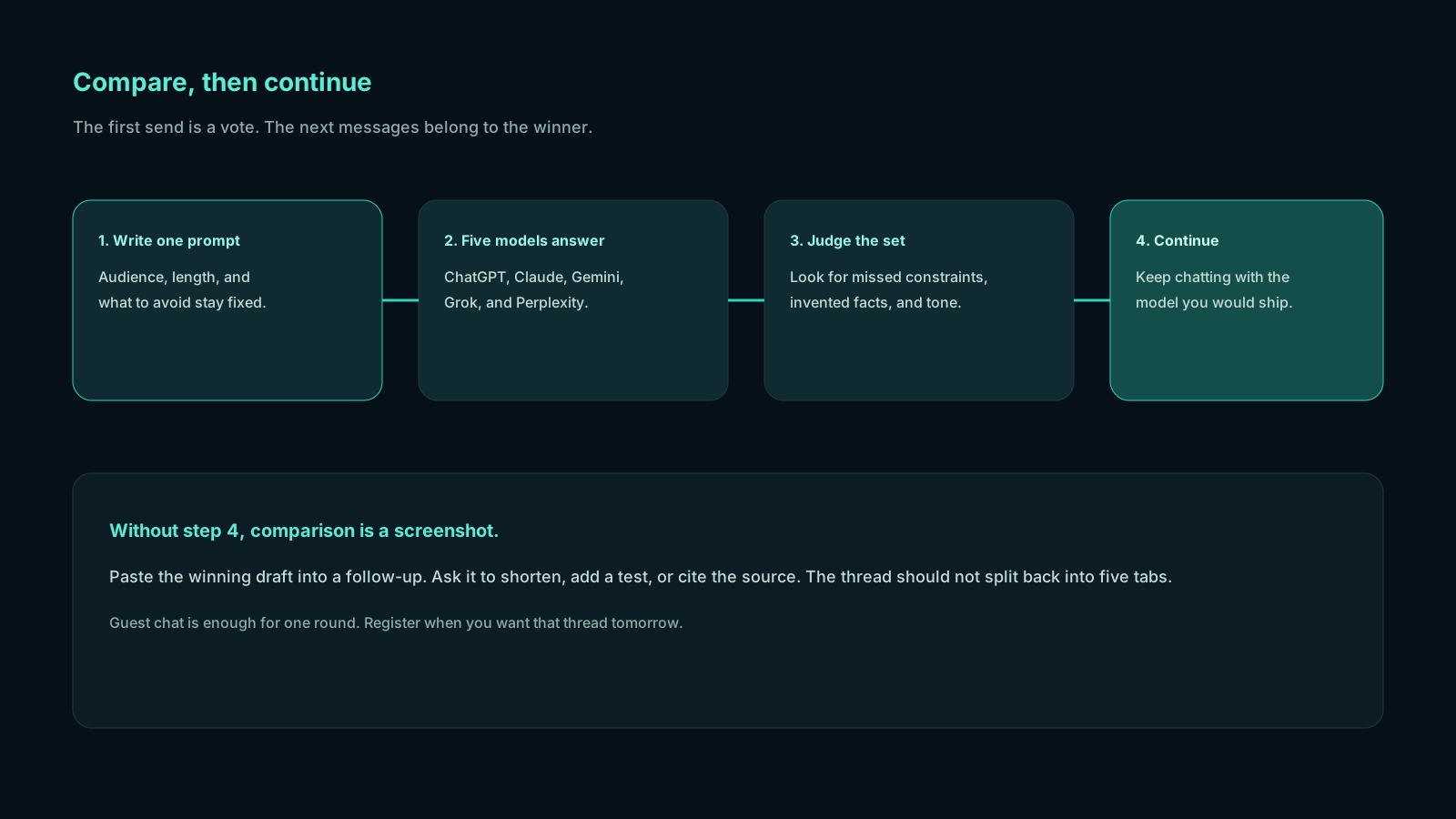
Open chat. Send one prompt you actually need:
Draft a one-page project update for a non-technical stakeholder. Do not invent metrics. Flag anything that needs a human number.
Watch ChatGPT, Claude, Perplexity, Gemini, and Grok stream. Continue with the card that did not fabricate a dashboard. Ask it to add a risks section. That is the whole product.
You can do analogous work in a BYO-API client after you have wired the models. The difference is when the work starts: after configuration, or at the first message.
Projects and history matter once this is daily. Plus ($10) and Pro ($20) are the plans for people who organize that work. Starter ($5) is the light compare package. Guest chat is how you find out whether you care.
Pricing without inventing the other receipt
Do not compare a made-up TypingMind license number to Chativo. Look up TypingMind if the client fee matters to you. Then add the API usage you will actually incur. Then compare that bundle to a managed plan.
Chativo’s published prices are $5, $10, and $20 per month. That is the complete public package list for this product. It is not a claim that BYO-API cannot be cheaper at some usage levels. High-volume users with existing keys sometimes prefer paying providers directly. Low-volume users often prefer not to think about token bills at all.
The decision is: operator overhead versus product simplicity. Keys are overhead. Managed compare is simplicity. Pick the one you will still be using in a month.
Frequently asked questions
Straight answers to the questions this article usually raises. Each question is separate from its answer so you can scan on a phone or a desktop.
Is Chativo a TypingMind alternative if I like BYO-API?
Only if you are willing to give up bringing your own keys. A TypingMind alternative in the managed sense is for people who found key setup heavy. If keys are the feature you wanted, stay with a BYO-API frontend.
How is a TypingMind review different from TypingMind vs ChatGPT?
TypingMind vs ChatGPT asks whether a third-party shell beats OpenAI’s own UI. A TypingMind review for comparison asks whether you can see several models on one prompt without becoming an API admin. Those are different jobs.
Do I need API keys to compare ChatGPT, Claude, Gemini, Grok, and Perplexity?
Not on Chativo. The five-model round is the product. You can try it in guest chat. In a typical TypingMind-style setup, you would supply keys (and provider billing) for the models you want in the client.
Is BYO-API more private?
It can be, in the narrow sense that your provider accounts are yours and the frontend may keep data more locally, depending on how you run it. It is not automatically private. Keys and prompts still leave your machine toward model APIs. Read both vendors’ practices instead of assuming.
What does Chativo cost if I do not want to manage keys?
$5, $10, or $20 per month, depending on plan. Start with guest chat if you only need to see whether compare-then-continue is the workflow you wanted.
If API consoles were the only thing between you and a fair compare, a managed TypingMind alternative is the shorter path. Run five models on one prompt, continue with the winner, and leave the keys to someone else.
Related reading
- OpenRouter vs Dedicated Multi-Model Chat: Which Is Easier for Daily Work?
OpenRouter is a strong API router for developers. A dedicated multi-model chat workspace is usually easier for daily writing, research, and coding. Here is a fair way to choose.
- Magai vs Chativo: Is a Dedicated AI Comparison Tool Worth It?
Magai is a multi-model workspace aimed at creators and content workflows. Chativo is a dedicated comparison tool: ChatGPT, Claude, Perplexity, Gemini, and Grok on one prompt, then continue with the winner.
- ChatHub vs Chativo: Browser Extension vs Dedicated AI Comparison Workspace
ChatHub is a browser extension for chatting with multiple models, often side by side. Chativo is a dedicated workspace that compares ChatGPT, Claude, Perplexity, Gemini, and Grok, then continues with the winner.