Best AI Chatbot for Business in 2026
9/8/2026 · Chativo Editorial · 9 min read
The best AI chatbot for business in 2026 is rarely a single vendor. ChatGPT, Claude, Perplexity, Gemini, and Grok each win different work: emails, proposals, research, and strategy. Compare all five on the same prompt, then continue with the winner so the rest of the thread stays coherent.
A business AI assistant has to survive a real inbox: a client pricing question, a proposal that must not over-promise, an internal brief leadership will actually read. One model can sound confident and still miss the tone. Another can be careful and still bury the ask. If you only keep one tab open, you never see the miss. This guide is for operators, founders, and account managers who use AI for business communication every week. It is not a vendor score. The useful question is which workflow lets you choose the strongest reply before you paste it into email.
| Task | ChatGPT | Claude | Perplexity | Gemini | Grok |
|---|---|---|---|---|---|
| Client email | Strong default drafts; easy to scan | Careful tone; good at caveats | Better as a research brief than a letter | Clear structure; useful when Google context matters | Direct and informal; watch polish |
| Proposal outline | Practical sections and next steps | Strong trade-offs and scope language | Useful for market or competitor context | Organized options with a recommendation | Cuts fluff; may under-specify legal tone |
| Internal strategy memo | Clear answer-then-plan shape | Followable reasoning without hype | Live-web flavor when the question is current | Friendly breakdown of options | Sharp point of view; less formal |
| Pricing or objection reply | Specific and usable | Good at not over-claiming | Helps with public-fact checks | Balanced options | Blunt; edit before sending |
| Research for a pitch | General knowledge, fast | Careful synthesis | Strongest when you need sources and recency | Solid overview | Fast take; verify claims |
No column wins every row. That is the point. The best AI chatbot for business is the one you can test on this prompt, not the one a review site crowned last quarter.
Why the best AI chatbot for business is more than one model

Teams still treat “which AI should we buy?” as a brand decision. In practice it is a task decision. The same person may need Claude’s caution for a contract-adjacent summary, ChatGPT’s default clarity for a follow-up email, Perplexity’s web-backed brief for a market check, Gemini’s option-style outline for an internal plan, and Grok’s blunt rewrite when a draft is too long.
If you lock the company to one model, you will keep using that model for jobs it is average at. People then add unofficial second tabs. That is how you get five subscriptions, five chat histories, and no shared thread.
A comparison-first workspace reverses that. You ask once. You see five live answers. You continue with the winner. The rest of the conversation stays on the model that already understood the job.
You can run that workflow in guest chat before you pick a plan. Paid packages are $5, $10, and $20 per month. Chativo, from MB Stack Company, is a dedicated compare-then-continue workspace, not a single-vendor clone.
AI for business communication: emails, proposals, and client replies

Most business use is not “write a novel.” It is short, high-stakes language: a reply that must be warm without being weak, a proposal section that must be specific without inventing delivery dates, a status update that executives will not rewrite.
Here is a workflow that holds up in an actual workday.
- Paste the incoming email, the brief, or the messy notes. Include constraints: audience, length, what you must not promise.
- Send one prompt to ChatGPT, Claude, Perplexity, Gemini, and Grok together.
- Read for sendability, not for who sounded smartest. Look for a clear ask, correct facts, and a tone you would put your name on.
- Continue with the winner. Ask for a shorter version, a more formal version, or a version with pricing still TBD.
- Do a human pass. AI does not replace judgment on legal, financial, or HR language.
That last step is not optional. Comparing models reduces the chance that one hallucinated date or one overly aggressive claim ships. It does not make the output automatically true. For emails and proposals specifically, see Best AI for Emails and Proposals. Freelancers who sell similar work from a laptop will get more from Best AI Chat for Freelancers.
A prompt that usually produces comparable drafts:
You are writing as [role] at [company] to [audience]. Goal: [one sentence]. Constraints: [length, tone, facts that must stay, claims we cannot make]. Incoming context: [paste]. Give me a sendable draft and a 3-bullet version I can skim.
Run that once across five models. You will usually get one draft you can edit and four that teach you what to steal: a better subject line, a clearer fee table, a calmer close.
What a business AI assistant should actually do
A business AI assistant is not a novelty chat. It should do four jobs well enough that you keep using it after the first week.
Draft under constraints. “Write a proposal” is a weak prompt. “Write a two-page proposal for a 6-week content audit, no retainer language, USD pricing, Pakistan-friendly payment note” is a job. The assistant should follow the constraints instead of padding.
Show trade-offs. Strategy questions need options, not a fake single answer. Claude is often strong here. Gemini often offers two or three paths. ChatGPT is often the most scannable default.
Check the public facts. When the question depends on a current product, a competitor page, or a news item, Perplexity is the card you read first. Then you still verify anything you will send to a client.
Stay in the thread. After you pick a winner, follow-ups should not reset. “Make it shorter,” “remove the guarantee,” and “add a next-step calendar invite line” only work if the same model keeps context.
If a tool cannot do that last job, you are collecting screenshots, not working. That is why a dedicated compare workspace beats opening five native apps and hoping you remember which tab had the good paragraph.
How ChatGPT, Claude, Perplexity, Gemini, and Grok differ at work
Treat the following as working notes, not a permanent ranking. For a deeper model-by-model matrix, read ChatGPT vs Claude vs Gemini vs Grok vs Perplexity.
ChatGPT is the default many teams already trust: clear, structured, easy to paste. It goes generic if the prompt is generic.
Claude is the careful reader for scope language, hedges, and high-cost claims. It can run long; continue with it, then ask for a tighter version.
Perplexity is the research brief. Use it when the question is “what is true out there?” rather than “write this in our voice.”
Gemini is organized and option-friendly: internal plans, meeting notes, two approaches. Compare the actual draft anyway.
Grok is direct. Useful when a draft is polite and useless; risky when the audience expects formality. Steal the spine, then continue with a more polished model if you need a sendable letter.
None of this replaces a live compare. Run your text, not a review-site sample.
A practical workflow: ask once, compare, then continue
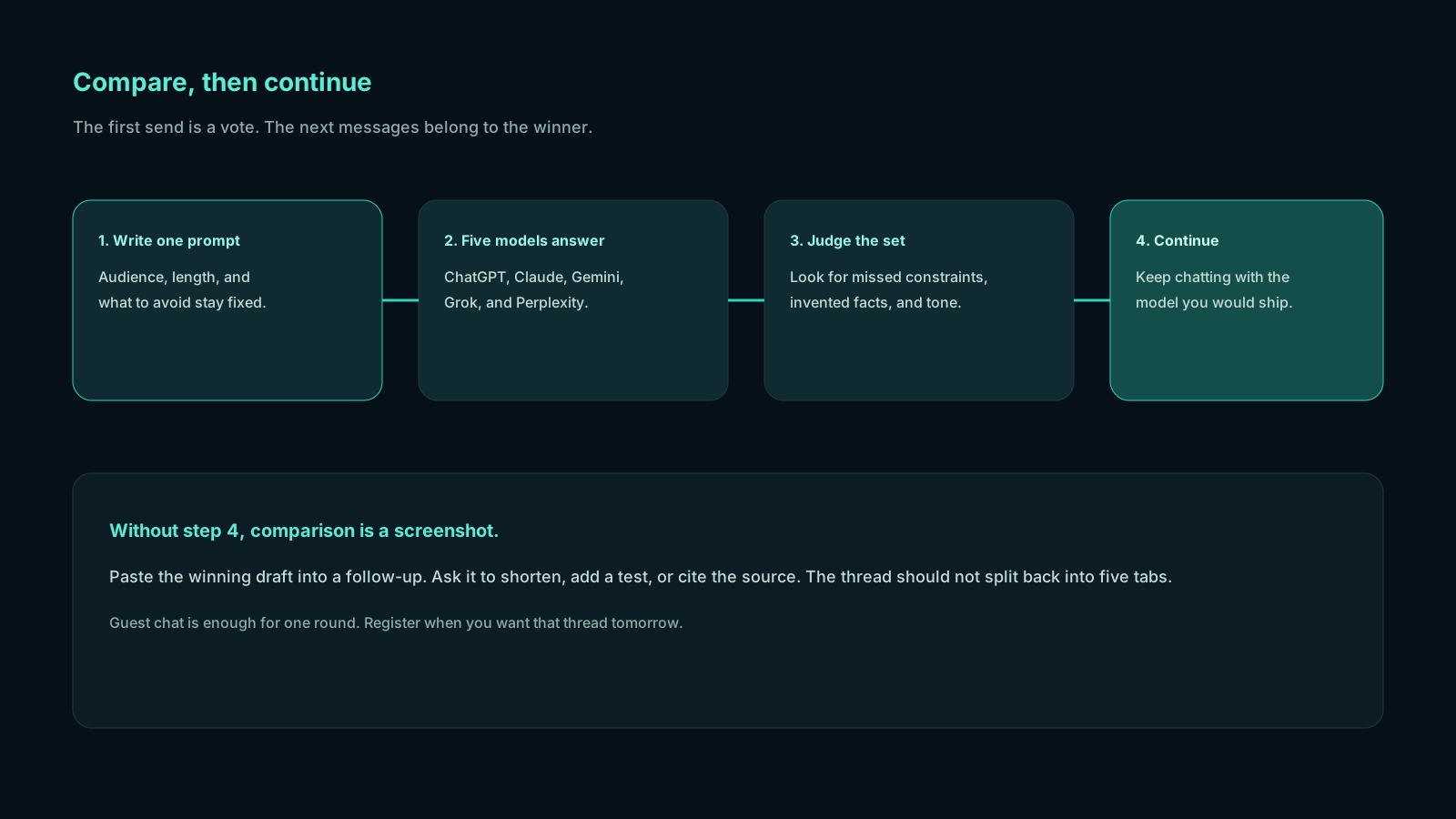
Open chat. If you are not ready to register, use guest chat. Paste one real work prompt. Watch five answers stream. Ignore branding. Score each card on three checks:
- Would I send this with my name on it, after a light edit?
- Did it invent a date, a number, or a commitment we did not provide?
- Does the next message need this model’s strengths (care, sources, brevity, structure)?
Click continue on the winner. The thread now behaves like a normal chat with that model. You are not starting over in a new bot picker.
Examples: a lead reply with a floor price and no invented availability; a one-page proposal that leaves dates blank; a CEO update that stays short. If two cards are close, continue with the one that already matched the tone and steal a sentence from the other. Humans still merge. The tool’s job is to put the candidates on one screen.
Pricing without stacking five subscriptions
Native apps are excellent when you live in one ecosystem. They get expensive when the habit is “Claude for this, ChatGPT for that.” You do not need every vendor’s paid plan, but you should notice if you already bounce between two or three of them.
A comparison workspace is one product. Plans are $5 Starter, $10 Plus, and $20 Pro per month, with full five-model compare. Guest chat lets you test first. That is often cheaper than extra subscriptions you only use to second-guess each other. The hidden cost of skipping a compare is time: rewriting a salesy proposal, or sending a research-flavored email from the wrong tool. For teams shopping the best AI chatbot for business on budget, one workspace beats a stack of overlapping chats.
Who this setup is for (and who should stay on one model)
Use a compare-then-continue workspace if you:
- Write client-facing language more than once a week
- Already open two AI tabs “just to check”
- Need a business AI assistant for mixed work (email + research + planning)
- Care more about the sendable draft than about a single vendor’s app extras
Stay on a single native app if you:
- Live inside one ecosystem’s files, plugins, or team workspace
- Only need AI for low-stakes brainstorming
- Have a compliance rule that names one approved vendor
The second group is real. Not every company should abandon ChatGPT or Claude. The best AI chatbot for business is an output decision. If you cannot see the alternatives, you cannot choose.
Frequently asked questions
Straight answers to the questions this article usually raises. Each question is separate from its answer so you can scan on a phone or a desktop.
What is the best AI chatbot for business in 2026?
There is no permanent winner across every task. ChatGPT is a strong default for drafts. Claude is often better when tone and caveats matter. Perplexity is stronger for current research. Gemini is useful for structured options. Grok is useful when you need a blunt rewrite. The best AI chatbot for business is the one that wins this prompt after you compare.
Can one business AI assistant replace a whole team’s writing?
No. It can draft, outline, and challenge a first pass. People still own facts, pricing, legal language, and relationship tone. Comparison makes the draft better. It does not make the draft official.
Is comparing five models slower than using ChatGPT alone?
The first turn takes longer to read. The full job is usually faster, because you spend less time regenerating in one tab and less time discovering a better angle after you already sent v1. Continue-with-winner keeps follow-ups as quick as a normal chat.
How should teams use AI for business communication without leaking secrets?
Do not paste credentials, unpublished financials, or personal data you would not put in a vendor’s chat product. Treat every model as a third party. Write prompts with the minimum context needed. Review outputs before they leave the company.
Do I need five paid subscriptions to compare ChatGPT, Claude, Gemini, Grok, and Perplexity?
Not if you use a workspace that runs those models on one prompt. You can try that in guest chat and then choose a $5, $10, or $20 plan if the workflow sticks.
If you already know the pain of tab-switching, skip the debate and run one real email or proposal through all five models. Compare these models on Chativo, pick a winner, and finish the thread there. See packages when guest chat is not enough.
Related reading
- Best AI for Emails and Proposals: Compare Drafts from 5 Models
Ask one brief, compare five tones from ChatGPT, Claude, Perplexity, Gemini, and Grok, then continue with the draft you would actually send.
- Best AI Chat for Freelancers: One Prompt, Five Expert Replies
Send one brief. Compare ChatGPT, Claude, Perplexity, Gemini, and Grok on proposals, emails, and pricing copy. Continue with the winner.
- How Developers Compare AI Coding Assistants in 2026
Paste the same bug once. Compare ChatGPT, Claude, Perplexity, Gemini, and Grok. Continue with the model that understood your stack.